How to create a personalised graduation crossword
A graduation crossword is a small game made of memories: the solver must recognise nicknames, habits, exams and places important to the graduate. Here you will find an example to adapt and the steps for adding it to your graduation poster.
1. Start with a few answers that tell someone’s story
Start with six or eight words: a nickname, a memorable exam, the university town, a hobby, a favourite food and a treasured object. Use different answers with some letters in common, giving the generator more opportunities to connect them.
In Papiro Studio each answer must contain at least two letters; the generator starts with a 20-by-20 grid. Answers longer than 20 letters do not fit. Spaces, numbers and punctuation are removed, and accents become unaccented letters: “café” becomes “CAFE”. Check the answers after generation.
2. Write personal clues that people can understand
A good clue gives a hint without revealing the word. Add a detail friends can recognise, avoiding overly private references or jokes that could make someone uncomfortable.
| Answer | Clue |
|---|---|
| DEGREE | The milestone that brought us all here today. |
| THESIS | The file called “final version” at least five times. |
| LAUREL | The leaves in today’s crown. |
| PARTY | The one appointment nobody wants to postpone. |
| COFFEE | The companion of the longest study sessions. |
| SLEEP | The subject you neglected before the last exam. |
Replace two or three generic answers with real details: the cat’s name, the group nickname or your favourite place for breaks. Ask a friend who knows the graduate but did not write the puzzle to try the clues.
3. Generate and check the crossword
- Open a template or the blank canvas from Papiro Studio’s home page.
- Select Crossword in the top bar.
- Edit the answer/clue pairs. Use Add word for new rows; the × removes a row.
- Write a title, such as “How well do you know the graduate?”
- Press Generate grid and check the preview.
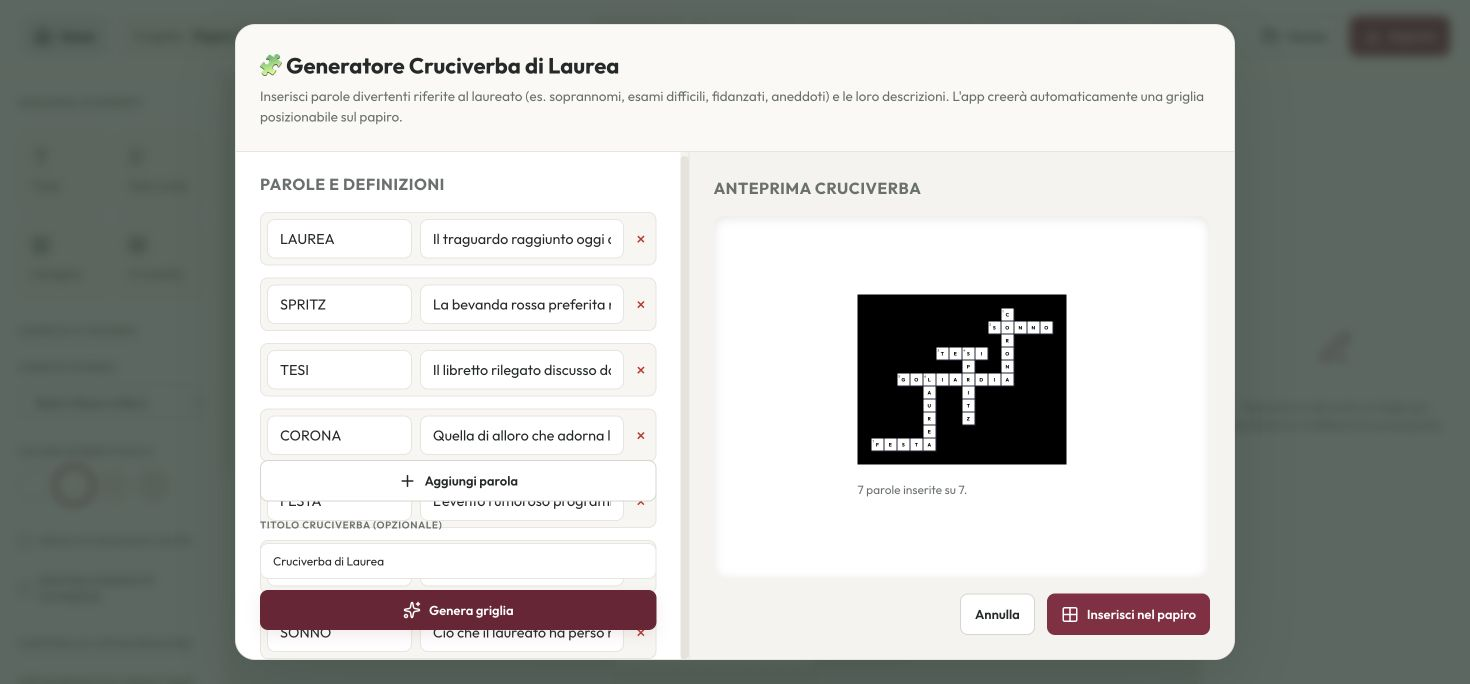
Not every list produces a complete grid. The result tells you how many words were placed and which were skipped. If an answer is missing, try a shorter word or one sharing letters with the others. Duplicate answers are skipped: changing an accent or adding a space does not create a different word.
If you change words or clues, generate the grid again before inserting it. Check the clues and make sure every answer is the one you intended.
4. Insert the puzzle and prepare the file
Press Insert into poster, then move and resize its box on the page. Leave enough room for both the cells and the clues: a tiny crossword may be difficult to solve even if it fits the layout.
Use the margins check and make sure the puzzle does not overlap text. Save the project as JSON so you can edit it later. Export a draft to proofread the clues and, when everything is ready, generate a PDF or PNG at your chosen size, checking the effective resolution in the summary.
Frequently asked questions
Can I create the crossword for free?
Yes. The generator is included in Papiro Studio and works in your browser without signing up. You do not need to install a program.
Why is a word not placed?
It may be too long, duplicated or unable to find a valid crossing. Read the generation summary and edit the list: the program does not force an incorrect crossing just to include every word.
Are the answers printed on the poster?
The generator preview shows letters so you can check the result. The crossword inserted into the poster has empty cells and clues for the graduate to solve.
Bring your memories to life
Choose a template, customise your poster and export it for printing. Free, with no sign-up.
Create your free graduation posterContinue with the guide: How to write a graduation poster: rhymes, layout and printing.